
How to Make the Hit the Road Dude AI Video
Last updated
To make the hit the road dude AI video here, upload one photo of the driver, pick the place, the model, the quality and the sound, and pay with credits. About 5 minutes later you download a 15-second vertical MP4 of that person (or pet) at the pickup window, glaring at the camera, pointing and waving it away, with the meme's original sound or silent, and no watermark.
Step 1: upload one photo
Open the hit the road dude generator and add a photo: one person or one pet, face fully visible, in good light. The driver's face, hair or fur and clothes come from this photo; the truck, the place and the camera come from the scene.
Tick the box confirming it's your photo or that you have permission. Photos of children or public figures aren't allowed.
Step 2: pick the place
The default is the pickup by the pond, the white truck on the grass from the original clip. Thirteen other places keep the same glare and wave in another vehicle:
- Holidays: Christmas Eve sleigh, New Year's Eve fireworks, Lunar New Year lanterns, Valentine's rose road, Thanksgiving hay tractor, Halloween pumpkin pickup
- Everyday: pickup on the beach, pickup on the front lawn, farm tractor, golf cart, rowboat on the lake, horse cart in the snow
- Out there: moon rover
Step 3: pick model and quality
The video is always 15 seconds and vertical (9:16), ready for TikTok, Reels and Shorts. You choose the model and the quality, and the button shows the cost before you pay.
| Model | 480p | 720p |
|---|---|---|
| Standard | 5 credits | 10 credits |
| Fast | 10 credits | 20 credits |
| Pro | 15 credits | 35 credits |
| Ultra | 25 credits | 55 credits |
All four are ByteDance's Seedance models (Seedance 2.0 Mini, 2.0 Fast, 2.0 and 2.5). Standard is the cheapest way to try it; Fast or Pro give a cleaner face for posting, and Ultra the best results.
Step 4: pick the sound
- Original sound: the meme's audio laid over your video, lined up with the scene.
- No sound: a silent video. Pick this if you want to post with the trend's sound from TikTok's sound library, so your post shows up under the sound.
Step 5: pay with credits
With enough credits, the video starts right away. Otherwise pick a credit pack and pay at checkout; your photo and choices are kept, and rendering starts when you come back. Packs are a one-time payment and leftover credits never expire: see all credit packs.
Step 6: wait about 5 minutes, then download
Rendering takes about 5 minutes, with progress on the page. You can close the tab: the link is emailed to you and the video is saved in My videos. Tap Download MP4, or Share on your phone. If a render fails, its credits come back automatically.
A real render from this generator
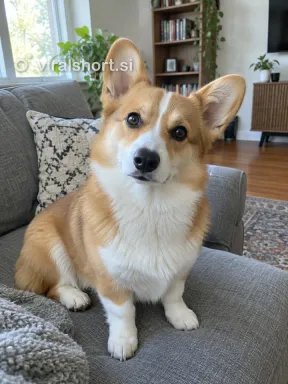 The photo it was made from
- Model
- Seedance 2.0 Fast
- Format
- 9:16 · 480p
- Length
- 15 s
- Rendered
The pets in these photos are AI-generated. Customers’ photos and videos are never shown here.
Photos that work
The driver is filmed from close up, so the face matters more than the outfit.
Use:
- One person or one pet, nobody else in the frame
- Waist up or closer, facing the camera
- Daylight or bright, even light
Avoid:
- Group photos, or several pets in one photo
- Blurry, very dark or heavily filtered photos
- Sunglasses or masks that hide the eyes: the glare is the joke
Before you post, label the video as AI-generated where the app asks. For ideas on who to cast and which place to pick, see the hit the road dude meme generator guide.
Make your hit the road dude video from one photo
Upload one photo, pick a place, and the 15-second scene is ready in about 5 minutes. Credit packs from $9.99, no subscription.
Make my hit the road dude videoFrom 5 credits a video · original sound or silent · no watermark · failed render, credits back
FAQ
How long does the hit the road dude AI video take to make?
About a minute to upload and pay, then about 5 minutes of rendering. You can close the page: the link is emailed to you and the video waits in My videos.
How long is the video?
15 seconds, the whole scene from the first glare to "hit the road", vertical 9:16 at 480p or 720p, with no watermark.
How many credits does it cost?
From 5 credits (Standard, 480p) to 55 credits (Ultra, 720p). Credit packs start at $9.99 for 10 credits ($6.99 on your first order), are a one-time payment and never expire.
Can my dog or cat be the driver?
Yes. The pet sits upright behind the wheel like a person, keeps its own fur and markings, and does the glare and the paw waves. It is never turned into a person.
Does the driver say the lines?
The mouth moves with the timing of the original scene, and Original sound lays the meme's audio over it. It isn't word-perfect lip sync, so pick No sound if you'd rather add your own voice-over.
What if the render fails?
Its credits go back to your account automatically, so you can try again, ideally with a sharper, brighter photo.